Top 15 Best Gadgets for Your Desk You Can’t Miss!
Messy cables, cluttered surfaces, and poorly designed tools can make any workspace feel chaotic. The best gadgets for your desk help keep everything organized and accessible, preventing frustration during work.
Cheap or ill-fitting accessories often slide around or fail to accommodate all your devices, making the desktop more of a mess than a help.
Materials that resist scratches and stains are key, since desk gadgets endure constant use. Size matters too; gadgets should fit comfortably without crowding the space, typically staying under a foot in width or depth. Power options also count, USB-powered gadgets offer convenience but need to match your port availability.
A good desk gadget balances sturdiness with ease of cleaning, often using smooth surfaces like metal or hard plastic that don’t attract dust or grime.
Need a Quick Check?
| Image | Product | Price |
|---|---|---|
Our Top Picks 1  | LISEN Phone Stand | Check Price |
Our Top Picks 2 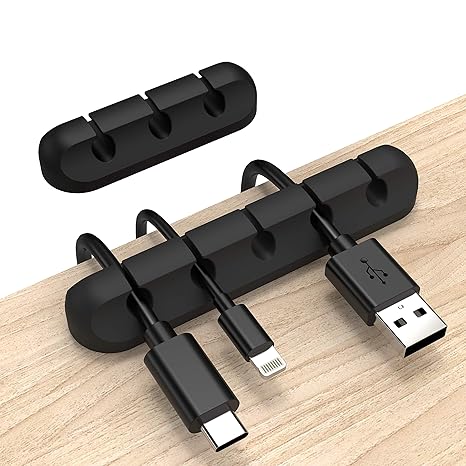 | Cable Clips Organizer | Check Price |
Our Top Picks 3  | Kinetic Metal Spinner | Check Price |
Our Selected Top 15 Gadgets for Your Desk for Different Needs
This list includes a range of practical desk gadgets that boost productivity, comfort, and organization. Each review covers how the product performs, its ideal user, and highlights both its strengths and potential drawbacks to help you make an informed choice.
1. LISEN Cell Phone Stand
Great for anyone who spends a lot of time on video calls or watching videos on their phone, the LISEN Cell Phone Stand helps improve posture with its ergonomic, adjustable design. It suits desk setups where comfort and clear screen visibility without straining the neck are priorities.
Setting it up requires just placing it on a flat surface since it’s a standalone desktop mount. Its adjustable height ranges from 7.1 inches to 8.5 inches, letting you customize for a better viewing angle between 5° and 85°. The slim size, similar to a pencil’s length, fits easily on crowded desks, perfect for quick TikTok videos, Zoom meetings, or streaming games.
The stand holds devices like smartphones, tablets, and even small laptops steadily while allowing easy angle changes that don’t block subtitles. Its build quality feels stable and well-made for everyday use, although some users mention the top height might be a bit short for taller setups. Comfort in use and reducing neck strain stands out as its biggest benefit.
Many appreciate how well the stand reduces neck strain by offering fine angle and height adjustments while holding devices securely. The most mentioned complaint is the modest maximum height, which doesn’t suit all desk arrangements.
People focused on improving posture during video calls or casual viewing will find this stand very useful. Those needing a taller support or heavier device compatibility may want to look for alternatives with higher or stronger mounting options.
Pros
- Adjustable height and angle improves viewing comfort
- Compatible with many smartphones and tablets
- Compact size fits easily on busy desks
- Does not block subtitles during video use
Cons
- Maximum height may be too low for some setups
- Limited to devices no larger than small laptops
| Specification | Details |
|---|---|
| Mounting Type | Tabletop |
| Adjustable Height | 7.1in-8.5in |
| Adjustable Angle | 5°-85° |
| Form Factor | Stand alone |
| Compatible Devices | Samsung Fold 8, Smartphone, iPad, Kindle, Nintendo Switch, Small laptop |
2. Cord Organizer Cable Clips
Silicone material gives these cable clips a flexible yet sturdy feel, perfect for keeping cords in place on any smooth surface. Ideal for anyone looking to beat cable clutter without any complicated installation. Its strongest feature is the reliable 3M adhesive that sticks firmly while causing no damage.
Setting these clips up is quite straightforward. The adhesive pad sticks easily to clean wood, glass, plastic, or metal surfaces, so you don’t need tools or screws. The silicone slots hold charging and USB cables without forcing them in, allowing cables to slide smoothly but stay organized on your desk or wall.
They keep cables from tangling or bending excessively during daily use.
They do a solid job of preventing cable mess and tangling with a flexible grip that doesn’t harm the cables. The build quality feels durable for indoor use, made by INCHOR with eco-friendly materials.
Most users praise the strong adhesive that lasts well. A common issue is the limited number of pieces in each pack, which might not cover larger setups.
The product is praised for its strong adhesive and flexibility, making cable management simple and effective, but many mention the small pack size as a downside for bigger cable setups. The silicone material holds cables firmly without damage, which is useful for both desks and walls.
The clips suit anyone who needs a tidy workspace without fuss and doesn’t require many holders. Those with extensive or outdoor cable needs might want to look for alternatives offering more pieces or weather resistance.
Pros
- Strong 3M adhesive holds well on smooth surfaces
- Flexible silicone slots for easy cable insertion
- Non-damaging to cables and surfaces
- No tools needed for setup
Cons
- Only 2 clips per pack might be too few
- Designed for indoor use only
| Specification | Details |
|---|---|
| Material | Silicone |
| Adhesive Type | 3M adhesive pad |
| Indoor/Outdoor Usage | Indoor |
| Number of Pieces | 2 |
| Number of Packs | 2 |
| Brand | INCHOR |
3. Kinetic Metal Fidget Spinner
Floating steel ball effect captures attention immediately, making it ideal for anyone who spends long hours at a desk and likes to keep their fingers busy. Its smooth, perpetual motion creates a relaxing visual that helps with focus.
The build quality stands out as its single biggest strength, offering a solid feel during use.
Setup involves simply placing the spinner on your desk, ready to go without any fuss. Rotating the spinner gently sets the ball spinning within the twisted bracket, providing a hypnotic motion that doesn’t require batteries or complex maintenance. Its fully detachable structure makes cleaning straightforward, so dust or debris doesn’t get in the way over time.
The steel ball spins smoothly without jitter, maintaining its perpetual motion look that fascinates during moments of creative thinking. Crafted from solid aluminum alloy, the item weighs 130g, giving a satisfying hand feel that’s neither too light nor cumbersome. A common point noted is that the floating effect is an illusion, which may disappoint those expecting an actual magnetic or levitating mechanism.
The smooth, jitter-free spinning and distinctive floating ball design offer an engaging experience, but some may find the illusion aspect less impressive than expected. Being made from solid aluminum alloy gives it a satisfying weight and durability.
People looking for a tactile desk toy with a strong build and calming visuals will appreciate this spinner. Those wanting a true floating or magnetic levitation gadget might want to explore other options.
Pros
- Unique floating ball visual effect
- Made of durable solid aluminum alloy
- Smooth, jitter-free spinning action
- Fully detachable for easy cleaning
Cons
- Floating ball effect is just an illusion
- Not suitable for those expecting magnetic levitation
| Specification | Details |
|---|---|
| Item Weight | 0.13 kg |
| Manufacturer Part Number | LT-897 |
| Material | Solid Aluminum Alloy |
| Age Range Description | Adult |
| Number of Items | 1 |
4. Small Desktop Glass Whiteboard
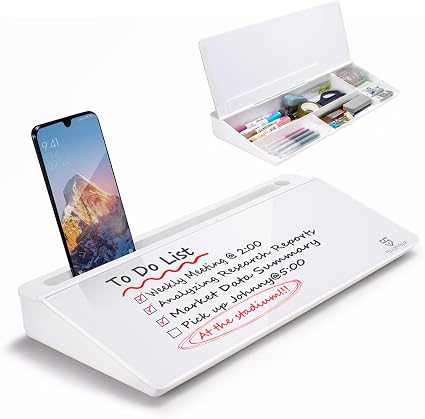
Perfect for anyone looking to keep notes and ideas front and center while working, this small desktop glass whiteboard fits neatly between your keyboard and monitor. Its biggest plus is the clever slope angle that lets you comfortably jot down reminders or use it as a stand for your keyboard.
Setup is straightforward as it simply sits on your desk without needing attachments or complicated assembly. Day to day use involves smooth writing thanks to the durable temple glass surface, making it easy to doodle or list things quickly.
Wiping clean is painless and fast, so staying organized doesn’t interrupt your flow or eat into your work time.
Performance shines through with a writing surface that stays crisp and white, maintaining clear visibility of everything you note down. The glass build feels sturdy and doesn’t smudge easily, which keeps it looking fresh even after repeated use. Some users mention wanting a larger writing area, but its compact size is what allows it to fit perfectly at a desk setup without taking up excess space.
The whiteboard’s smooth glass surface makes writing clear and easy to wipe off repeatedly, staying bright without ghosting. Its main downside is the relatively small size, which limits how much information fits at once on the board.
Anyone who wants a neat, compact place to quickly jot notes during work sessions will appreciate this design. Those needing larger spaces to write long lists or detailed plans might want to look for a bigger whiteboard option instead.
Pros
- Compact design fits between keyboard and monitor
- Slope angled for comfortable writing
- Durable glass surface resists stains and smudges
- Includes a duster for easy cleaning
Cons
- Writing area may feel small for extensive notes
- Only one pack included
| Specification | Details |
|---|---|
| Brand Name | TSJ OFFICE |
| Model Number | TSJWB1806W |
| Unit Count | 1 Count |
| Included Components | Duster |
| Recommended Uses For Product | Home, Office, School |
| Manufacturer | TSJ INTERNATIONAL |
5. Desktop Boxing Game

Long hours at your desk can get dull, and having a way to release stress without walking away is handy. The Desktop Boxing Game fits those moments perfectly, offering quick bursts of fun and energy right where you work.
It suits anyone looking for a lively and active break during their workday.
Setting it up doesn’t take much space or effort, making it easy to have on hand. The game responds well to your punches, providing immediate feedback that keeps you engaged. Playing in short sessions throughout the day feels natural, as it doesn’t interfere with your workflow and requires minimal maintenance.
Its build stands up well to repeated hits, showing decent durability despite its compact size. Punch detection is responsive, which is its strongest feature, but a few mention occasional glitches in tracking fast combos.
The materials feel solid, making it a reliable companion for desk workouts and quick distractions.
Many find the quick punch feedback engaging, making desk breaks more active and enjoyable. Some experience tracking issues with faster punches, which can interrupt the flow of play. The consistent build quality earns praise for lasting through repeated use without damage.
Those who want a little excitement and stress relief without leaving their workspace will appreciate this. People needing a more intense or varied workout might want to look for other options with broader features or longer play intervals.
Pros
- Compact size fits easily on most desks
- Responsive to quick punches
- Sturdy materials withstand frequent use
Cons
- Occasional glitches with fast punch combos
- Limited to short play sessions
| Specification | Details |
|---|---|
| Power Consumption | 15W |
| Weight | 3.0 kg |
6. Magnetic Levitating Globe Lamp

Floating with almost no friction, the Magnetic Levitating Globe offers a unique visual focus for anyone wanting a standout desk accessory. Its magnetic levitation mechanism creates a captivating centerpiece, perfect for those who appreciate a bit of tech flair combined with an elegant design.
Setup involves securing the globe onto the base and using the included tool to position it until it begins to float on its own. Once in place, the globe rotates smoothly for about 25 minutes without touching anything, maintaining a steady spin that draws attention without distraction.
Its compact 6.8-inch diameter fits well on most desks without crowding.
The levitation system works remarkably well, holding the globe suspended smoothly above the base. Constructed with care by Poojaed, it combines aesthetics with functionality, though some users mention occasional difficulties with initial alignment during setup. The quality of materials and finish stand out, making it a reliable decorative gadget for everyday use.
The strongest praise centers around the globe’s smooth and captivating levitation, which makes it a striking addition to any workspace. The most common complaint involves the challenge of properly aligning the globe on the base during initial setup, requiring some patience and adjustment.
People looking for a visually impressive desk ornament with unique technology will find this globe rewarding. Those wanting a continuously rotating globe without needing occasional resetting may want to consider other options.
Pros
- Unique magnetic levitation feature
- Long-lasting rotation with minimal friction
- Compact size fits most desks easily
- Elegant, high-tech appearance
Cons
- Alignment during setup can be tricky
- Rotation lasts about 25 minutes only
| Specification | Details |
|---|---|
| Brand Name | Poojaed |
| Item Diameter | 6.8 inches |
| Manufacturer | Poojaed |
| Number of Items | 1 |
| Part Number | TG03 |
7. QLKUNLA Newtons Cradle Desk Toy

People curious about physics or looking for a simple, eye-catching desk accessory will find this toy a neat fit. Its greatest appeal lies in visibly demonstrating how energy moves through the balls, making it both fun and educational.
It suits anyone wanting a low-key way to express interest in science while adding some quiet motion to their workspace.
Setting up involves placing the Newton’s pendulum on your desk, there’s no assembly needed beyond that. It stays stable during use, letting you drop one or two balls easily to watch momentum transfer before your eyes.
Cleaning is straightforward since it’s a single piece, and it doesn’t require power or charging, so it’s ready whenever you want a quick distraction or a thinking break.
The momentum transfer works smoothly and reliably as expected from a classic Newton’s cradle. The build holds up well for desktop use, showing quality more than enough to last through many cycles of balls swinging.
People often praise its clear demonstration of physics, while a common downside is that it only comes as one complete unit without customization or extras.
The toy effectively demonstrates energy transfer in a way that’s easy to watch and understand, capturing the essence of Newton’s cradle in a single compact unit. Frequent remarks mention appreciation for its educational value, though some note that it lacks options for personalization or scaling.
People interested in science visuals or who want a quiet, meditative desk item will enjoy this. Those looking for more interactive or varied features might prefer exploring other gadgets with extra components or digital aspects.
Pros
- Clear visual display of momentum transfer
- Simple to set up and use right away
- Suitable for children and adults alike
- Functions as both decor and an educational tool
Cons
- No customization or extra features included
- May take up some desk space
| Specification | Details |
|---|---|
| Brand Name | QLKUNLA |
| Model Number | A-09 |
| Included Components | Newton’s pendulum X1 |
| Manufacturer recommended age | 3 years and up |
| Educational Objective | Literacy & Spacial Awareness |
8. Excel Shortcut Mouse Pad

Excel Shortcut Mouse Pad stands out by combining a handy shortcut guide with a compact mouse pad, perfect for anyone who works frequently with Excel, Word, PowerPoint, or Windows. It fits comfortably on a desk or tucks away into a bag, making it ideal for professionals, students, or those on the move who want quick access to useful shortcuts.
Setup involves simply placing it on your desk or carrying it alongside your laptop. The compact size at 11.8 x 9.8 fits nicely beneath your mouse without taking up much space. Day-to-day, it serves both as a smooth surface for accurate mouse control and a quick refresher for essential shortcuts, helping speed up workflow without hunting through menus.
Performance-wise, the finely-textured surface delivers precise and smooth mouse movements that suit work or casual gaming. It’s built sturdy enough to endure regular use while remaining portable. Reviewers often praise the convenience of having shortcuts handy at all times, while some mention the limited size might not accommodate larger mouse movements comfortably.
Having essential shortcuts right under your hand helps reduce time spent searching through menus, which many appreciate. Some find the mouse pad’s compact size too restrictive for larger movements during more dynamic tasks.
People working regularly with Microsoft Office programs or Windows shortcuts will get the most value, especially those needing portable desk accessories. Those requiring larger mouse pads or broader shortcut coverage might want to consider alternatives.
Pros
- Compact and portable design fits easily in bags
- Includes shortcut keys for Excel, Word, PowerPoint, Windows
- Smooth, finely-textured surface for accurate mouse control
- Supports faster workflow with quick shortcut reference
Cons
- Small size may limit wide mouse movements
- Shortcut guide limited to specific software only
| Specification | Details |
|---|---|
| Brand | Kinevolve |
| Size | 11.8″ x 9.8″ |
| Number of Items | 1 |
| Unit Count | 1 Count |
| Warranty Description | 30 days return and exchange |
9. Golf Pen Desktop Game

Golf Pen Desktop Game offers a fun twist to your regular writing tool by combining a ballpoint pen with a mini golf game. It suits people who like a bit of distraction while working or want a unique gift. Its biggest strength is bringing playful breaks to a routine desk setup.
Setting it up is simple since it works like any ballpoint pen with a screw-off cap. Daily use feels natural thanks to the contoured grip, designed for both left and right-handed users.
The pen writes smoothly with blue, red, or black ink options, while the mini golf game adds a quick, light distraction during short breaks.
Writing performance holds up well, maintaining a fine 0.7mm line without skipping. The build is solid for a pen and the integrated gaming feature stands out as its main appeal.
Some users mention the mini golf part feels a bit gimmicky and could distract or take up extra space unnecessarily.
The ballpoint pen writes smoothly with fine lines and includes a fun mini golf game for occasional breaks. Most complaints focus on the gaming feature feeling unnecessary for those who prefer a simpler pen on their desk.
People who enjoy a little play mixed with their writing will appreciate this pen’s dual function. Those wanting a straightforward, compact pen without extra parts might prefer to look elsewhere.
Pros
- Includes mini fidget toy for desk breaks
- Contoured grip fits both hands comfortably
- Available in three ink colors
- Fine point delivers precise writing
Cons
- Mini golf game can feel like a distraction
- Not ideal for users needing a compact pen
| Specification | Details |
|---|---|
| Writing Instrument Form | Ballpoint Pen |
| Ink Color | Blue, Red, Black |
| Drill Point | Fine |
| Line Size | 0_7mm |
| Hand Orientation | Ambidextrous |
| Closure Type | Screw Off Cap |
10. Magnetic Cable Clips Holder

Cord chaos disappears with magnetic cable clips that hold most cords securely. Perfect for anyone juggling multiple devices at their desk, the magnetic lock is the standout feature that keeps everything in place without constant readjusting or cords slipping away.
Setup is straightforward, just peel and stick the clips wherever cords tend to slip or tangle. Daily use means pulling cords in and out easily, thanks to the strong magnetic grasp. The clips handle various cables nicely, from chargers to mouse cords, keeping them tidy and easy to access in any workspace.
Performance delivers on the promise of a firm hold without damaging cables. Build quality feels solid with a reliable magnetic lock that prevents cords from falling off.
Most people appreciate how well it secures charging heads, while some mention the clips can be a bit tight for unusually thick cables.
The magnetic clips are praised for their firm hold and convenient cable access, minimizing mess on a busy desk. The most common downside is that cables thicker than 0.3 inch (7.5mm) don’t fit well, which limits some users with bulkier cables.
Anyone managing standard charging and peripheral cords will find this organizer very helpful. For desks with irregular or larger cable sizes, alternative solutions might be necessary to avoid fit issues.
Pros
- Strong magnetic lock holds cables firmly
- Works with various cord types and sizes
- Easy to open and close for cable access
- Includes eight clips for multiple cables
Cons
- May be too tight for thicker cables
- Designed for indoor use only
| Specification | Details |
|---|---|
| Brand | COOCAT |
| Model Number | CC-MCC-01 |
| Number of Pieces | 8 |
| Indoor Outdoor Usage | Indoor |
| Diameter of Cords Held | about 0.3 inch (7.5mm) |
11. ODISTAR Mini Desktop Vacuum

Perfect for tidying up small messes on your desk, the ODISTAR Mini Desktop Vacuum works well for anyone needing quick and easy cleanup without cords. Its cordless design offers great freedom, making it really simple to use anywhere at your workspace.
Setup involves just inserting 2 AA alkaline batteries, which last about 4 hours, enough for guessing your desk won’t get neglected. The 360º rotatable design means you can reach tricky spots between keyboards and corners easily. It’s lightweight and portable, so grabbing it to clear crumbs or dust from your desk or computer feels natural and fast.
The capture nozzle cleans up larger debris more effectively than typical manual vacuums. The build is sturdy enough for regular use and the quiet 5 db noise level helps keep distractions low.
Most praise points to it being efficient for small debris, while some mention needing to replace batteries regularly as a minor downside.
The vacuum’s cordless feature and 360º rotation get constant praise for easy handling and reaching hard-to-clean gaps. Most find battery replacement the biggest hassle, as it requires fresh AA batteries more often than expected.
Suits anyone wanting quick desk cleanup without the fuss of cords or outlets nearby. Those needing stronger suction or longer operation times might want to consider other options with rechargeable batteries and multiple speeds.
Pros
- Cordless design for portable use anywhere
- 360º rotatable to reach tight spaces
- Quiet operation at only 5 db
- 200 ml capacity catches larger debris
Cons
- Batteries not included, must replace regularly
- Only one speed and power level
| Specification | Details |
|---|---|
| Power Source | 2 AA alkaline batteries required |
| Battery Life | 4 hours |
| Noise Level | 5 db |
| Capacity | 200 ml |
| Surface Recommendation | Desktop, Computer, Keyboard |
| 360º Rotatable Design | Yes |
12. LISEN Aluminum Cell Phone Holder
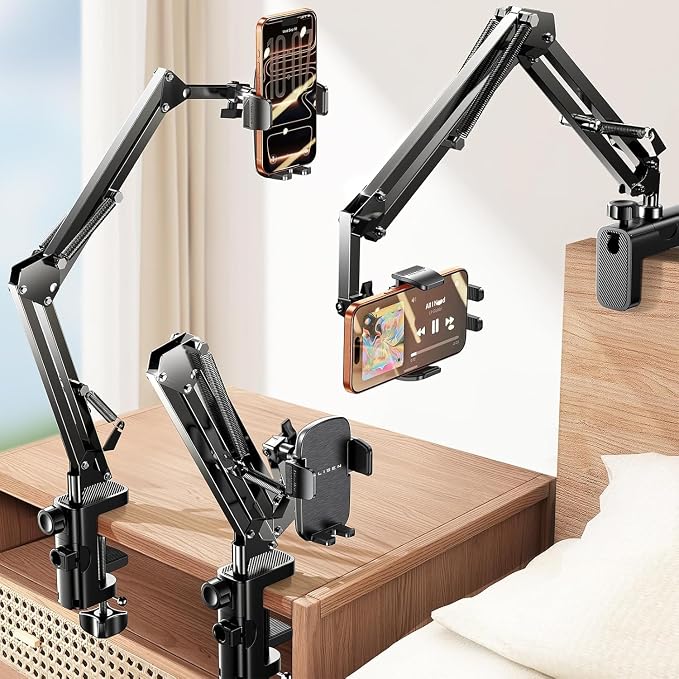
Aluminum construction gives this phone holder a solid, durable feel that works well on any desk. Suited for anyone wanting a reliable, adjustable stand for phones between 4 and 7 inches, it shines in supporting a wide range of devices with a flexible gooseneck arm allowing easy positioning.
Setting it up takes seconds since it clamps or stands securely without slipping. The adjustable arm bends smoothly, and you can rotate the phone for the perfect angle.
It stays stable during everyday use whether you’re video calling, watching content, or following a recipe while working. The design feels sturdy but not bulky, blending in with desk setups.
The stand does a great job holding phones steadily at any chosen position without wobble. Its aluminum frame is tough but lightweight, holding the weight of even the largest phones firmly. Strong praise often highlights its flexibility and durability.
A common complaint is it does not fit iPads or dual-screen phones, limiting compatibility.
The aluminum build gives the holder excellent durability and flexibility, allowing secure phone positioning for many models. Users appreciate its sturdy feel and fluid arm adjustment. Complaints mainly focus on it not fitting tablets or dual-screen phones, which limits usage beyond standard smartphones.
People who want a dependable, adjustable stand for everyday phone use on desks will find this very useful. Those needing a holder for larger tablets or specialized phones should consider other options to better fit those devices.
Pros
- Strong and durable aluminum body
- Wide compatibility with multiple phone models
- Flexible gooseneck for easy adjustment
- Comes with 24-month warranty and support
Cons
- Not compatible with iPads or dual-screen phones
- Clamp mount may not fit very thick surfaces
| Specification | Details |
|---|---|
| Compatible Devices | iPhone 18 pro max, 17, 16, 15 series and more |
| Compatible Phone Size | Smartphones 4 to 7 inches |
| Mounting Type | #1 Top Rated |
| Additional Features | Adjustable, Flexible, Gooseneck, Rotatable arm |
| Warranty | 24-month free warranty |
13. Monitor Memo Boards Set

Clear acrylic memo boards that stick firmly to your monitor or other smooth surfaces stand out because of their strong adhesive and clean look. Ideal for anyone who juggles tasks or reminders during computer work, their biggest strength lies in keeping notes visible without cluttering the desk.
Peeling off the protective film and pressing the boards onto both sides of a monitor is straightforward thanks to the 3M stickers. Day-to-day use is practical, you write reminders or important tasks and stick them right where you’ll see them. The included phone holder and charging hole add convenience, and you can also attach the boards to the fridge or any smooth wall for extra flexibility.
Marked by durable, transparent acrylic, these memo boards stay clear and resist wear. They hold up to 500g without losing grip, so notes or small items won’t fall easily. The main compliment is their strong sticky quality and visibility, while some users mention a slight shine can catch reflections under bright lights, occasionally distracting.
Users appreciate the outstanding stickiness and clarity of the acrylic, making daily notes always visible and secure. A common downside is that the shiny surface can reflect light, occasionally distracting focus when working under certain lighting conditions.
Anyone needing to keep important notes front and center during computer use will like having these boards at their desk. Those who work in brightly lit environments or want to post notes on textured surfaces might find these less suitable and could consider alternatives.
Pros
- Strong 3M adhesive supports up to 500g reliably
- Highly transparent, making notes easy to read
- Multifunctional design with phone holder included
- Durable and wear-resistant acrylic material
Cons
- Glare from acrylic surface can cause reflections
- Limited to flat, smooth surfaces for sticking
| Specification | Details |
|---|---|
| Brand Name | OSPNIEEK |
| Model Number | XS-001 |
| Material | High-quality Acrylic & Authentical 3M Sticker |
| Special Features | Multifunctional design with phone holder and charging hole |
| Warranty Description | One Year |
14. Gaiatop USB Desktop Fan

Need a compact fan that won’t take up much space on your desk? Ideal for anyone who needs quiet, adjustable cooling at their workstation, this USB-powered fan stands out with its surprisingly strong airflow despite its small, lightweight design.
Setup couldn’t be simpler since it plugs directly into a USB port. Switching between three speed settings is easy with a button press, and rotating the fan head up to 30 degrees lets you direct airflow exactly where it’s needed.
Because it weighs less than 8 ounces and uses touch controls, it’s portable and friendly for use at home, the office, or even in the car.
The fan delivers a solid breeze without being noisy, staying below 50dB even on the highest speed. It’s built with a lightweight frame and five blades that push air efficiently. Most users appreciate the quiet operation as its best feature.
The main downside mentioned is that the highest speed requires a 5V/1A power source to run properly, which can limit some USB ports.
Many appreciate the fan’s quiet but powerful airflow as its standout feature. The most common frustration involves the need for a sufficiently strong USB power source to run the highest fan setting without issues. This affects usability on some ports that don’t deliver 5V/1A.
People working in quiet environments or needing a small, portable fan will be happy with this model. Anyone requiring a stronger or quieter fan that runs on low-powered USB ports might want to explore other options.
Pros
- Compact size fits easily on desks
- Quiet operation under 50dB
- Three-speed settings for flexible airflow
- USB powered for easy connectivity
Cons
- Highest speed needs 5V/1A power source
- Limited vertical tilt range of 30 degrees
| Specification | Details |
|---|---|
| Power Source | USB Powered |
| Noise Level | 50 db |
| Number of Speeds | 3 |
| Adjustable Angle | 30 Degrees Vertical |
| Weight | Less than 8 ounces |
| Wattage | 5 watts |
15. Kinetic Optical Illusion Spinner Ball

Stress and distraction often pile up during busy workdays, making it hard to focus. Designed for adults seeking a simple way to relax and re-center, this spinner ball offers a smooth, quiet spinning motion that catches the eye with a subtle optical illusion. Its strongest feature is how smoothly it spins to help clear your mind when you need a moment of calm.
Setup couldn’t be simpler, just give the hinge a drop of light machine oil to achieve spins lasting over three minutes. The aluminum build gives it a comfortably heavy feel that adds to the smooth rotation. Using it involves a gentle twist, which makes it handy for quick breaks without distracting noise or fuss.
The spinner does exactly what it’s meant to: create a hypnotic optical illusion while spinning quietly. Its solid aluminum body and high-quality bearings deliver long-lasting durability and a smooth, satisfying spin every time.
The most frequent praise highlights how calming and smooth the rotation is, while a common complaint is needing to oil the hinge occasionally for best performance.
Spinning smoothly with a pleasant quietness is what really impresses, but keeping the hinge oiled is necessary to maintain that performance. The simplicity keeps it reliable over time, though it does require a bit of occasional maintenance.
The spinner is great for anyone who wants a subtle, calming desk toy to relieve stress and boost focus. Those looking for more interactive or noisier gadgets should consider other options.
Pros
- Spins smoothly for over 3 minutes with oil
- Quiet thanks to high-quality bearings
- Heavy, smooth aluminum construction
- Creates a relaxing optical illusion
Cons
- Needs occasional oiling for smooth spin
- May not engage those wanting louder feedback
| Specification | Details |
|---|---|
| Brand Name | DBlosp |
| Model Number | CA-Desk-Y-38mm |
| Material | Special material aluminum |
| Included Components | kinetic desk toys |
| Manufacturer recommended age | 6 years and up |
Best Gadgets for Your Desk Comparison Table
| Product | Best For | Size | Power | Warranty |
|---|---|---|---|---|
| LISEN Phone Stand | Smartphones, Tablets, Small laptops | – | – | – |
| Cable Clips Organizer | Cable management indoor | 2 pieces per pack | – | – |
| Kinetic Metal Spinner | Adults, focus | 0.13 kg | – | – |
| Small Glass Whiteboard | Home, Office, School | Includes duster | – | – |
| Desktop Boxing Game | Desktop game | – | – | – |
| Magnetic Globe Lamp | Desk decoration, lamp | 6.8 inches diameter | – | – |
| QLKUNLA Newtons Cradle | Kids, literacy & spatial | – | – | – |
| Excel Shortcut Pad | Excel users | 1 unit | – | 30 days return |
| Golf Pen Game | Writing, mini fidget toy | – | – | – |
| Magnetic Cable Clips | Cable management indoor | 8 pieces | – | Product warranty |
| ODISTAR Desk Vacuum | Desk cleaning | 200 ml capacity | Portable, 1 speed | – |
| LISEN Aluminum Holder | iPhone holders | – | – | – |
| Monitor Memo Boards | Monitor memo & phone holder | Multifunctional, acrylic | – | 1 year warranty |
| Gaiatop USB Fan | Desk cooling fan | Small & light | USB powered, 3 speeds | – |
| Kinetic Illusion Spinner | Adults, kinetic desk toy | – | – | – |
- Best ForSmartphones, Tablets, Small laptops
- Size–
- Power–
- Warranty–
- Best ForCable management indoor
- Size2 pieces per pack
- Power–
- Warranty–
- Best ForAdults, focus
- Size0.13 kg
- Power–
- Warranty–
- Best ForHome, Office, School
- SizeIncludes duster
- Power–
- Warranty–
- Best ForDesktop game
- Size–
- Power–
- Warranty–
- Best ForDesk decoration, lamp
- Size6.8 inches diameter
- Power–
- Warranty–
- Best ForKids, literacy & spatial
- Size–
- Power–
- Warranty–
- Best ForExcel users
- Size1 unit
- Power–
- Warranty30 days return
- Best ForWriting, mini fidget toy
- Size–
- Power–
- Warranty–
- Best ForCable management indoor
- Size8 pieces
- Power–
- WarrantyProduct warranty
- Best ForDesk cleaning
- Size200 ml capacity
- PowerPortable, 1 speed
- Warranty–
- Best ForiPhone holders
- Size–
- Power–
- Warranty–
- Best ForMonitor memo & phone holder
- SizeMultifunctional, acrylic
- Power–
- Warranty1 year warranty
- Best ForDesk cooling fan
- SizeSmall & light
- PowerUSB powered, 3 speeds
- Warranty–
- Best ForAdults, kinetic desk toy
- Size–
- Power–
- Warranty–
How to Choose the Perfect Desk Gadget
Consider factors like functionality, size, and compatibility with your workspace to ensure the gadget truly meets your needs without cluttering your desk. Choosing the right features and durability helps avoid frequent replacements and keeps your work area organized and efficient.
Compatibility and Connectivity
Many gadgets fail to work right away because they don’t connect properly with the user’s device. Compatibility often gets overlooked, causing frustration when the gadget won’t sync with computers or smartphones.
Checking system requirements is crucial; some work only with Windows, macOS, iOS, or Android. Connection types also matter: USB usually offers reliable, plug-and-play use but can need extra ports. Bluetooth is convenient for wireless setups but sometimes drops connection or requires pairing.
WiFi connections can add flexibility but might involve more complicated setup and software.
A good device connects easily without extra adapters or complicated apps. Look for USB versions with plug-and-play support or Bluetooth devices boasting profiles supported by your system.
Knowing if the gadget needs specific drivers or apps helps avoid surprises. Testing compatibility beforehand avoids buying gear that ends up unused.
Ergonomics and Size
Desk space is often limited, and large gadgets can crowd a workspace or force awkward positioning. Size should match available room without compromising comfort. Devices that take up too much space usually disrupt workflow or make it harder to access other items.
Ergonomics plays a role too, gadgets designed to support natural posture reduce neck or wrist strain during long use.
Look for adjustable height, tilt, or angle so the gadget can be customized to personal preferences. Materials that offer some padding or grip prevent slipping and provide comfort.
Dimensions around 10 to 14 inches wide fit most desks without overcrowding. A compact, ergonomic design makes everyday use more comfortable and less fatiguing.
Functionality and Features
Using gadgets with clunky or confusing controls slows down work output and causes frustration. Devices that offer multiple functions replace clutter but only if the extra features work smoothly.
Basic models with straightforward buttons or touch controls often save time and reduce errors compared to overly complicated menus.
Prioritize devices that combine relevant features, you might want volume control, brightness adjustment, or customizable buttons. Features should align with daily tasks without requiring constant referencing of manuals. User-friendly interfaces with clear feedback make integrating a new gadget into the workspace easier and boost overall productivity.
Build Quality and Materials
Daily use exposes gadgets to knocks, spills, and constant handling. Poor materials show wear quickly, scratches, stains, loose parts. Devices built with sturdy plastics or metal frames last longer and handle rough desk environments without failing.
Lightweight models often tip or shift too easily during use, creating annoyance.
Choose gadgets with solid construction where buttons don’t wobble, seams are tight, and surfaces resist smudges or stains. Weight between 1 to 3 pounds is ideal for stability without being cumbersome.
Durable build quality ensures the gadget keeps working well over months or years, justifying the investment.
Power and Battery Life
Gadgets powered by batteries often need frequent replacements or recharges, interrupting use unexpectedly. USB-powered options draw power directly from the computer, simplifying cable management but adding wires to the desk.
Devices with internal rechargeable batteries vary widely: some last only a few hours, others several days.
Good battery life means less downtime and fewer reminders to recharge. Charging speed matters; a device that fully recharges in under 2 hours reduces waiting.
Look for energy-efficient gadgets with low power consumption to help minimize cables and maintain a cleaner setup. Consider choices that balance convenience with your typical usage patterns.
Maximizing Productivity: How to Integrate Desk Gadgets Seamlessly
Positioning your desk gadgets within easy reach reduces time spent searching or adjusting them during work sessions. Prioritize multifunctional tools that combine features like wireless charging with USB hubs to save space. Introducing a dedicated cable management system prevents tangled cords that slow down workflow and create clutter.
Tips for smoother integration:
- Place frequently used gadgets at the front or side of your workspace for quick access.
- Use stands or mounts to raise screens or tablets to eye level, boosting comfort and reducing neck strain.
- Choose devices compatible with each other, such as Bluetooth peripherals that connect without requiring multiple receivers.
Organizing gadgets this way creates a streamlined setup that supports focused work without unnecessary distractions.
Essential Maintenance Tips to Prolong the Life of Your Desk Gadgets
Regular cleaning prevents dust and debris from interfering with the performance of desk gadgets. Using a soft microfiber cloth to wipe surfaces and vents reduces the risk of damage.
For keyboards, compressed air helps clear crumbs and dirt from between the keys, maintaining responsiveness.
Additional care suggestions:
- Unplug devices before cleaning to avoid electrical issues.
- Keep liquids away to prevent accidental spills that may cause permanent damage.
- Store less frequently used gadgets in protective cases or drawers to minimize exposure to dust.
Routine checks for wear or loose connections also help catch potential issues early, extending the lifespan of your equipment.
Comparing Popular Desk Gadgets: Which One Fits Your Work Style Best
Wireless keyboards and mice offer freedom of movement but rely on batteries that require regular replacement or charging. Wired options ensure consistent connectivity without the need to monitor power levels, ideal for tasks that demand reliability.
Devices with adjustable stands allow customization of screen angles, benefiting users who switch between sitting and standing positions. Gadgets equipped with programmable buttons cater to work styles that involve repetitive tasks by saving time on frequent commands.
Consider these factors when selecting:
- Priority on mobility versus steady power supply.
- Ergonomic features that match your posture preferences.
- Compatibility with existing hardware and software.
Choosing the right gadget depends largely on how you interact with your workspace throughout the day.
People Also Asked
How Do I Properly Clean and Maintain My Desk Gadget?
Use a soft cloth dampened with water or a mild cleaner to wipe down your desk gadget regularly. Avoid harsh chemicals that can damage finishes. Unplug electronic gadgets before cleaning to prevent any accidental damage or shocks.
What Size Desk Gadget Fits Best on a Small Workspace?
Compact gadgets under 6 inches wide suit small desks well, minimizing clutter while still offering functionality. Aim for multi-functional tools that combine features to save space.
Are These Gadgets Safe to Use Around Children or Pets?
Most desk gadgets are safe if kept out of reach and properly secured. Small parts or charging cables can pose hazards, so store accessories smartly to safeguard children and pets.
Will This Desk Accessory Work with My Existing Devices?
Compatibility depends on the gadget’s input/output ports or wireless standards like Bluetooth. Check your device connections closely before purchasing to ensure they will work together without adapters.
How Long Do Typical Desk Gadgets Last with Regular Use?
Desk gadgets typically last 2 to 5 years under regular daily use depending on build quality and maintenance. Avoid dropping or exposing them to extreme temperatures to extend their lifespan.
Conclusion
Choosing the right desk gadgets comes down to how well they fit your daily routine, the space you have available, and how much you want to spend. Prioritize tools that improve your workflow and comfort without cluttering your workspace. Durable and easy-to-use items offer better value over time.
Think about where you’ll use each gadget and how often before making a choice. Something small might work best in a tight space, or you might want to save for a gadget you’ll rely on every day.
Check the comparison table and detailed picks above to weigh your options clearly before deciding.